
This guide translates a China-market article dated September 28, 2026. Interface directions, free-access offers, download instructions, and WeChat support refer to the Chinese app and the information reported at that time.
Remember: the goal on the first evening is not to finish a piece. It is to help your child clear one small level and want to open the app again tomorrow.
The article describes a familiar first evening after installing the app: a parent hands over the phone and says, “Give it a try.” The child opens it, scrolls through two screens, and asks, “Which piece should I play?” The parent does not know either and taps one at random. The child plays two lines, a few notes are marked on the screen, and the parent leans over to look. The child pushes the phone aside: “I don’t know how to do this.”
That is how the first evening ends. The next day, neither brings it up again.
For the first evening, following the steps below once is enough.
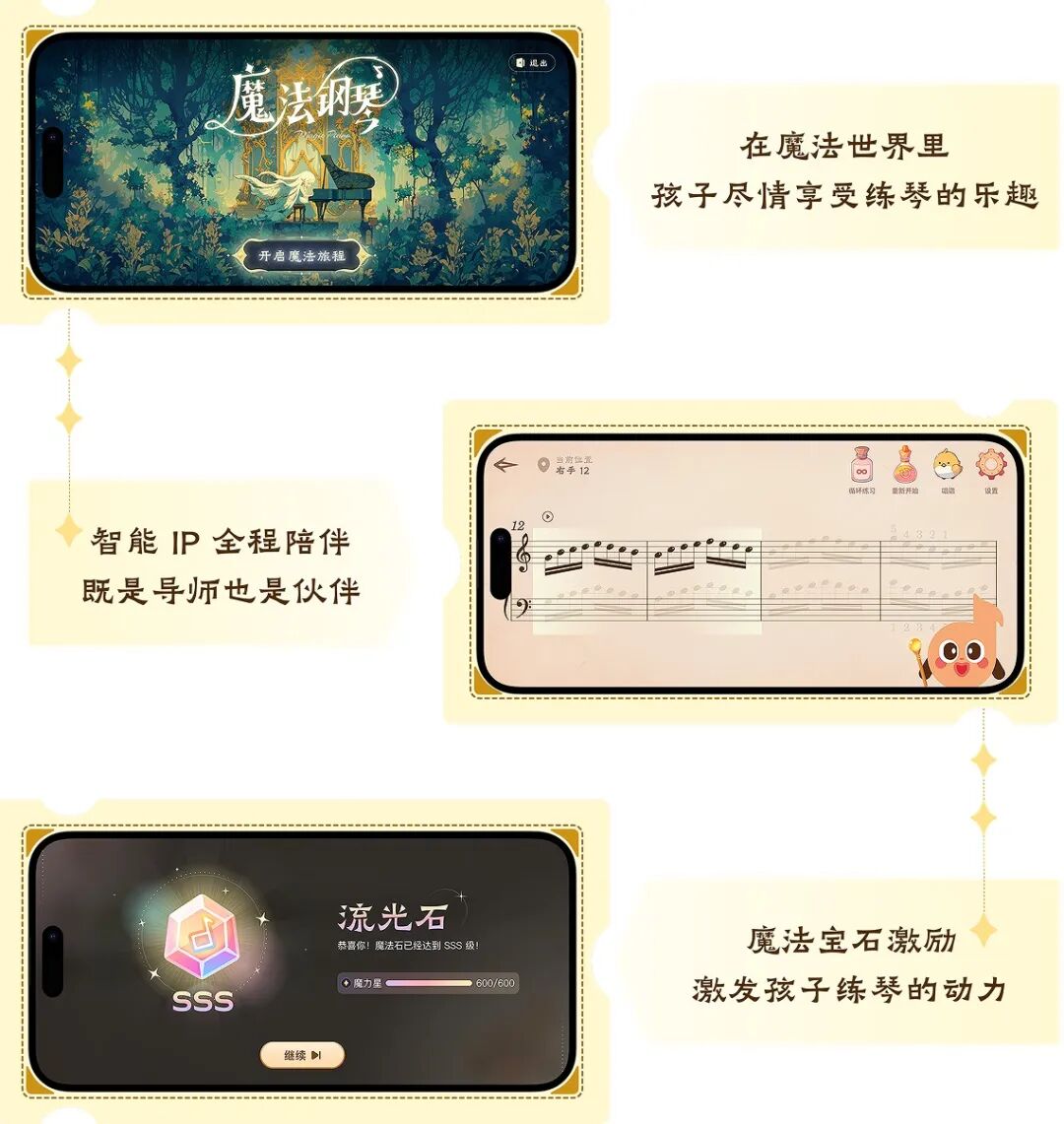
01 Put the Phone in the Right Place So It Can Hear the Piano
You can use either an acoustic or a digital piano. Stand your phone or tablet beside the music stand, making sure its microphone can pick up the piano clearly. The first time you open the app, it requests microphone access. Tap Allow: it needs to hear the piano to assess your playing.
Turn off the television first, and ask anyone talking nearby to keep their voice down. The app is listening to the piano; voices and television audio mixed in with it can make its assessment inaccurate.
02 Find the Piece Your Teacher Assigned This Week and Tap the Heart to Save It
Open the app and enter the Magic Hall, where you find pieces. The first icon at the top right is Search. You can search by piece title, collection name, or composer. Graded-exam pieces, works by renowned composers, popular pieces, and scales and studies are organized into categories, so you can also browse directly.
Once you find the piece, tap the heart on the right to save it. Each day after that, you can open it directly from “My Favorites” or “Recent Practice” without searching again.
Tap the piece to preview its score first, in landscape orientation by default, and check that it is the same version your teacher uses.
The library uses staff notation; numbered musical notation was not available at the time of the article. If you cannot find the piece your teacher assigned, you can submit a sheet music request in the app.
03 Choose Adventure for a New Piece and Clear Just One Small Level on the First Evening
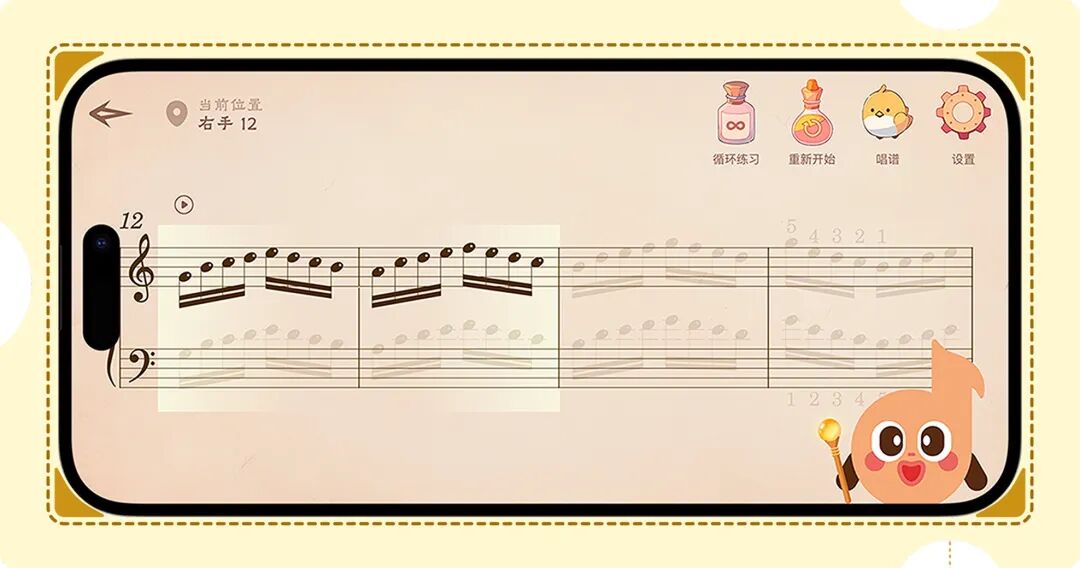
When you open a piece, there are two practice modes: Adventure, called 魔法闯关 in the Chinese app, and Challenge, called 魔法试炼. For a piece you have just started learning, choose Adventure.
Adventure breaks a piece into manageable practice tasks. First, it divides the music into major levels based on musical phrases. Each major level is then divided into short passages, with each passage forming a sub-level. Your child sees only the short passage in front of them at a time, usually around two measures.
In each sub-level, you practice the right hand first, then the left, and finally both hands together. As you play, the app follows the score. If you play a wrong note, the score stops advancing and waits until you play that note correctly. To clear a sub-level, complete the required number of repetitions or play through it once without any wrong notes.
On the first evening, do only this: major level 1, right hand, first sub-level. Stop when it is cleared, even if that took just six minutes. If your child wants to tap the next level on their own, let them.
There is no need to work through a phrase they already know in tiny sections. Use the whole-phrase challenge to play the entire phrase in one go instead.
04 Understand the First Feedback and Work on One Problem First
Challenge provides feedback after you finish a section or a whole piece. It displays pitch accuracy, rhythm, tempo, and completeness. Open the detailed results to see exactly where wrong notes, missed notes, and rhythm problems occurred.
When you first see the feedback, start with the lowest-scoring category. Replay the relevant passage with your child, then play it again to see whether that category improves.
Do not try to fix wrong notes, rhythm, and tempo all at once. Address one problem at a time so your child can hear what changed between the first and second attempts.
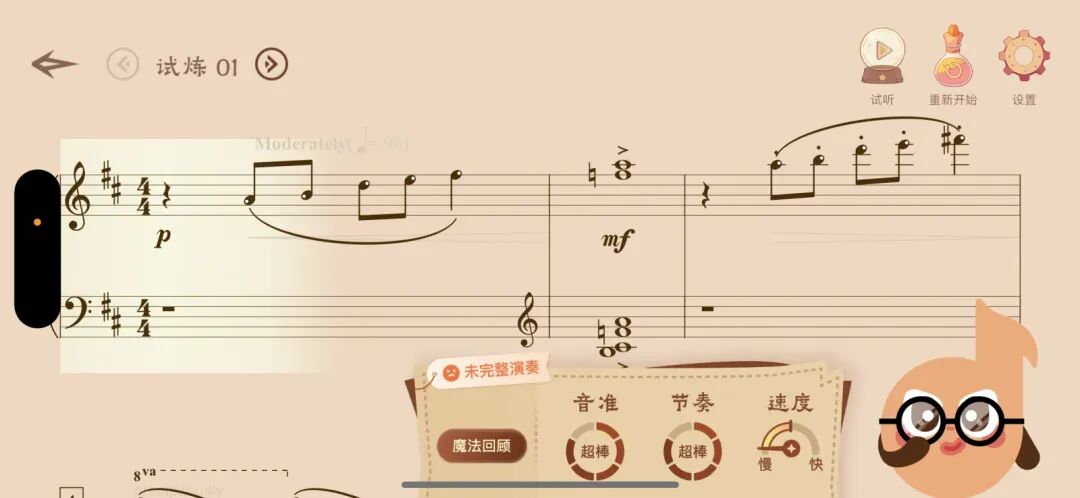
The app can give feedback on wrong notes, missed notes, rhythm, tempo, and completeness. Continue to follow the teacher’s guidance on hand position, touch, tone, and phrasing.
Task card for ten minutes tonight: find the teacher’s assigned piece → tap the heart to save it → enter Adventure → major level 1, right hand, first sub-level → stop once it is cleared, and see whether your child chooses the next level themselves.
05 What Is Free, and Who Can Help If You Get Stuck?
The China-market article stated that the first major level of every piece was free with no time limit, and that the first level in Challenge could also be practiced for free. It also described a few days of free membership for new users after installation, with access to all levels during that period. The membership expiration date could be checked using the third icon at the top right of the Magic Hall, the personal information icon.
Translator’s note: the original describes the new-user offer broadly. The registration rule documented in the September 18, 2026 code snapshot provides seven days of VIP access for eligible new users, subject to account and device membership checks; installation alone does not guarantee receipt. See the registration implementation. The offers above are retained as China-market information reported in the original, rather than a current Global entitlement.
If the app cannot detect the piano, you cannot find a score, or you do not know which level to choose, use the second icon at the top right of the Magic Hall to contact support.
How did your child react the first time they cleared a level?
06 Downloads and Customer Support
Product description: Wonder Piano is an AI piano practice companion app that turns practice into a level-based game. Through small tasks, immediate feedback, and rewards, it aims to make it easier for children to get started and reduce parents’ need to prompt them and argue about practice.
Download the App
For readers who had not yet installed the Chinese app, the original gave these instructions:
- iPhone and iPad: search for “西西魔法钢琴” in the App Store, or use the App Store download link mentioned in the article.
- Android phones and tablets: search for “西西魔法钢琴” in an app marketplace, or use the Tencent MyApp download link mentioned in the article.
The supplied source contains no actual download URLs for these two references.
Add Customer Support on WeChat
The original invited readers to add customer support on WeChat with questions about using the app, account issues, or requests for a free trial.